Monday, November 30, 2015

Back at Work After a Long Holiday Weekend

#MarketingMondays

Getting back on the grind after a long holiday weekend.  

Let's face it.  It's not easy to get back to work after spending time away from the office.  Projects you've put off now become your priority and you're a little slower at getting into the swing of your routine.  

With social media, you don't feel out of touch with your customer or what's going on - everything is documented in real time.

Every company is different and how they execute their social media is different.  The main thing to do is start the engaging conversation early.  Ask your customers/followers how their holidays were.  While you wait for their responses, plan out your week.  Identify what goals you wish to achieve and have a plan on how to make that happen.

Rome wasn't built in a day so don't feel you need to rush to get everything done.  Prioritize your projects and tasks.  They will get done but not if you are rushing to do so.  

Did you mean to make a post over the weekend and forgot to do so?  You can use the "backdate" option on Facebook.  You have your posted scheduled for when it should have been posted. 

Long weekends are great.  Getting back to the work world might not feel so great at first, but with the right planning, you'll be back into your routine in no time.  

Help us spread the word by sharing this on Facebook!

Monday, November 23, 2015

Features Verses Benefits Marketing

#MarketingMondays

Marketing:  Features Verses Benefits 

Features are great.  They are what differentiates itself from the competition.  But selling your product or service solely on features may not be enough for your customer.

Take Incutate for example.  We have really great features (which we call amenities) like wifi, storage, kitchenette, areas to lounge around in - our list can grow further. 

Okay, but why?

There needs to be value.  What is your customer going to gain from your product or service when they choose you?  Time and money are valuable things and for your customer, they want to know that they money they invest into your business is going to not only produce the results your company says, but help them solve the problem that caused them to seek you out in the first place. 
Benefits are going to satisfy the customer.  While it is important to explain what your product or service does, it is even more important to explain what the product/service will do.  You have to answer when the customer asks, "What is your product going to do for me?"

We answer that question with community, collaboration, and business resources for your success.  Sometimes, the best selling points are not that are tangible.

There is something called "pain points" that your customer is looking to alleviate with your product/service.  It is the "why" in their decision to buy.  You need to be a solution to your customer. Doing this and you will find there is more clarity and understanding in your campaign to target your customer.

Like' us on Facebook at Facebook.com/Incutate 
Follow us on Twitter with the handle @Incutate

Thursday, November 5, 2015

Google My Business: What It Is + October Results


A brief introduction if you aren't familiar with what Google My Business is:

Google My Business is an important tool when it comes to social media analytics.  Release June of 2014, this feature helps bring customers and businesses together under one roof using Google Search, Maps, and Google+.

What it looks like:

Say if you google search "Incutate," here's what's going to come up:
Your Google+ business account is so important when it comes to customers finding your business online.  You want to make sure that you are listed under your company's niche or field.  We orgionally were under "Office Rental Agency" and had to change when we weren't coming up under "Coworking Space" - lesson is choose wisely!

"Website" takes you to the website and "directions" makes it easier to route your commute/location.

Here's what it looks like when you google search "Coworking spaces south jersey":
 There we are!!

The ease of convenience for a customer to be able to interact with your company through finding your website, social media outlets, and being able to contact you is so important. 

How to get started with a Google+ page:

> https://accounts.google.com/signup
> Follow the prompts to creating your new account
> Note that you must verify your business before you will have a registered Google+ account.  Google will send you a pin you must use to register your business.  After that, you're official!

When making your Google+ account, realize this is now another social media outlet for your business.  Make sure the information you use is consistent across all platforms.

October Results:

Once your Google+ account is up and running, Google is kind enough to send you monthly statements - the interaction a customer had with your platform.  Here's what it looks like:
Google My Business is on your side to help your business grow organically.  Utilize these free tools to help kick-start your social media and Google search presence!

More information about Google My Business: www.google.com/business
                                                                           Google and Your Business
                                                                           Blog post on Search Engine Machine

Wednesday, October 28, 2015

Do you want our autograph? Incutate is featured in SJ Biz Mag's Close of Biz for their Novemeber issue!

Incutate was featured as the "Close of Biz" in this month's SJ Biz Magazine!  We're the only coworking space in Gloucester County (and proud of it) and we hope to reach more people in the future.

Thanks to Michelle Boyles for writing the article and coming by to visit our space!

You can read the article below or you can click here to follow the link to the digital version.

#coworking #southejersey #gloucestercounty #officespace #business #resources
 

Monday, October 19, 2015

Marketing SERIES? Three-Part Social Media Workshop!

#MarketingMondays

A three-part social media workshop?? What?! How awesome!  Instead of just reading about the do's and don'ts of social media, learn and work on how to leverage it for your business!  

Facilitated by Claudia Krusch of Social Coerce (the company Claudia founded), you will leave this workshop series like a seasoned pro.  

Seating is limited but we have a few spots open!  Don't miss out on this unique opportunity!  And remember - such a small investment in learning social media from a pro is going to pay off in the end. 

For more information and a link for registration, you can visit our Facebook at Facebook.com/Incutate

Monday, October 12, 2015

Taking It a Step Back: The Business Model Generation

#MarketingMondays

Taking It a Step Back:  The Business Model Generation

The Business Model Generation the best selling book written by Alexander Osterwalder and Yves Pigneur.  It simplifies the business model and breaks it down into 9 segments:

  • Customer Segments
  • Value Proposition
  • Channels
  • Customer Relationships
  • Revenue Streams
  • Key Resources
  • Key Activities 
  • Key Partnerships
  • Cost Structure
*Taken from the PDF preview of the BMG (http://www.businessmodelgeneration.com/downloads/businessmodelgeneration_preview.pdf)
 **Definitely take the time to read through the PDF.  There's a lot of great information in there.

What I like about this model is the fact that it breaks down the important parts of a successful business model.  Not only that, but there is the blank business model canvas below that helps you get started.
It is important for your company to have a solid business plan in place.  If not, you might find you or your company taking on more opportunities and ultimately stray from your original value prop.

It is also important from the marketing perspective because your marketing efforts should align with the rest of your business efforts.  You need to be able to identify your target audience, what channels you are using to get your product/service to market - all the things listed in the business model canvas.

Once those are identified, you now have legitimate goals to base your marketing campaigns off of.  There becomes a method behind your madness. You need to be able to understand the where and the why of your marketing efforts. 

If you have been in business for a while, the business model canvas/generation is also a great tool to help you to revisit your original business plan.

Have you used the business model generation or business model canvas before?  What are your opinions?  Let us know!

Monday, October 5, 2015

What is Google Analytics?

#MarketingMondays

Google Analytics...What is it?

A good social media presence is nothing without the ability to see how impactful it is. Being able to measure your traffic (the amount of people who go to your website) is important and you are doing yourself a disservice to be online and not measuring anything! 

Google Analytics is a free service from Google that allows you to learn the in's and the out's of your websites, social media outlets, SEO - there's a lot of features (https://www.google.com/analytics/standard/features/). 

Personally my favorite feature would have to be 'Audience Reporting' feature.  I love being able to use this data to understand who my target market is and understand a little more about them - like where they're from, how old they are, and this can be an attempt to start to piece together more of their needs.

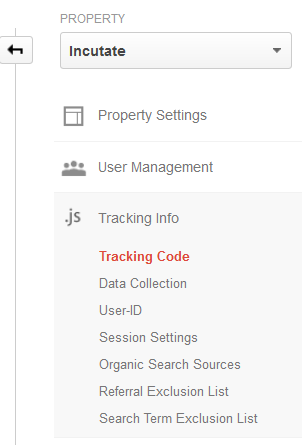
To get started with Google Analytics is easy.  Once you sign up for Google Analytics using a gmail account, go to your ADMIN tab to find your tracking code. 
You'll see a code for this information that you can put into your website's coding (it is in the HTML language).  We personally use Wix (wix.com) to create our website.  They have an option already allotted for Google Analytics code.  Make sure you reach out to whoever built your website to get this in there!

It will take at least 24 hours for Google Analytics to start picking up information for your website.  The best feeling is when you see your page views increase on the daily!  But it is also informative to see what pages are getting traffic and which ones aren't.

From using your Google Analytics data consistently, you will start to see trends in your traffic and your users, how people interact with your site and how they respond to your call of action.*

*Call of action is what you want to accomplish.  It can be something like driving people to your website or encouraging them to contact you - what you want your viewer to do when they interact with your social media/website.

This week covers the basics and how to get yourself started.  Next week, we will look into the nitty-gritty of your dashboard.  You'll be a pro in no time!

If you have any questions about social media or Google Analytics, ask us!  If you found this information useful and think it can benefit someone else?  Share it!